1. Intro to networking
- A computer network is collection of logically connected computing devices to communicate and share resources
- there is a node and a host nodes are the computers or devices and hosts are the devices with specials functions also called as servers
- A computer network consists of nodes(devices),cables, routers, switches, Network interface cards NIC
- NIC connects the device to a network (cable) and switches connet multiple devices to a network ,Nic has its own Mac address
- OSI model is a set of rules that explains how different computer systems communicate over a network ** Physical, DataLink, Network, Transport, Session, Presentation, Application**
- Client is a device which makes request, server is a device which Responds request
- Network cables connect devices, a switch forwards network traffic, a router connects and filter networks and packets, and a modem provides internet access.
- A router can filter traffic and switch can only switch traffic
- peering connects 2 vpc like man
- connectionless protocol means no direct connect between client server ,server sends msg anyone can process example UDP
-
Internet origin:
- Developed from packet-switching theory and TCP/IP.
-
Computer networking analogy:
- A highway system connecting devices; data travels from point A to B like cars on roads.
-
Computer network definition:
- A group of connected devices (nodes) sharing resources and communication.
-
Node and host:
- Node: Any device on a network (e.g., computer, router, printer).
- Host: A node with a specific function (e.g., server).
-
Basic network structure:
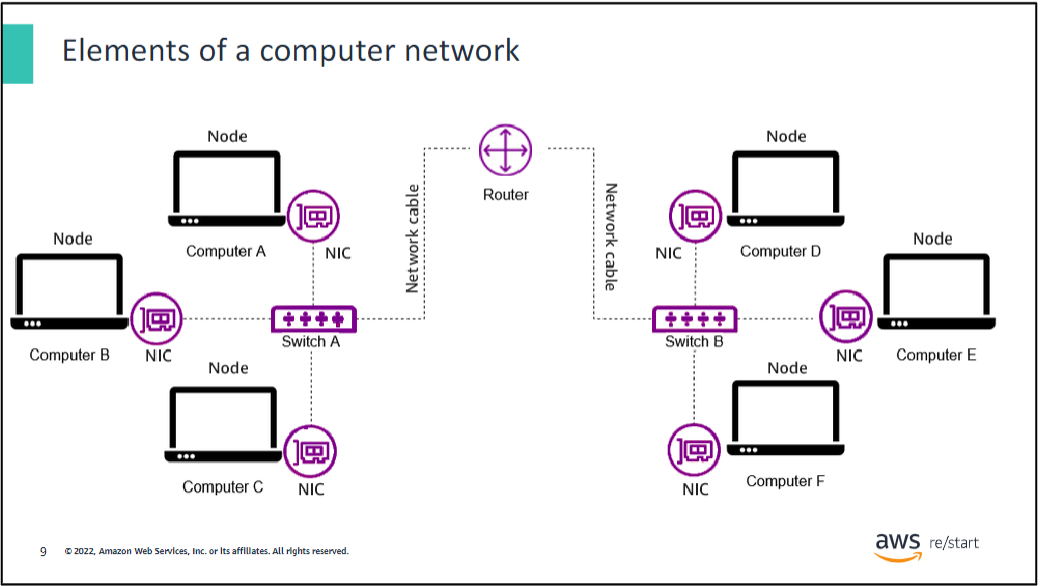
- Computers → Network Interface Cards (NICs) → Connected to a switch → Connected to a router.
-
Data in computing:
- Consists of bits and bytes (0s and 1s).
- Data types include character, text, numbers, and media.
- Can be transmitted across networks or stored.
OSI Model
The OSI model (Open Systems Interconnection Model) is a conceptual framework used to understand and standardize how data is transferred over a network.
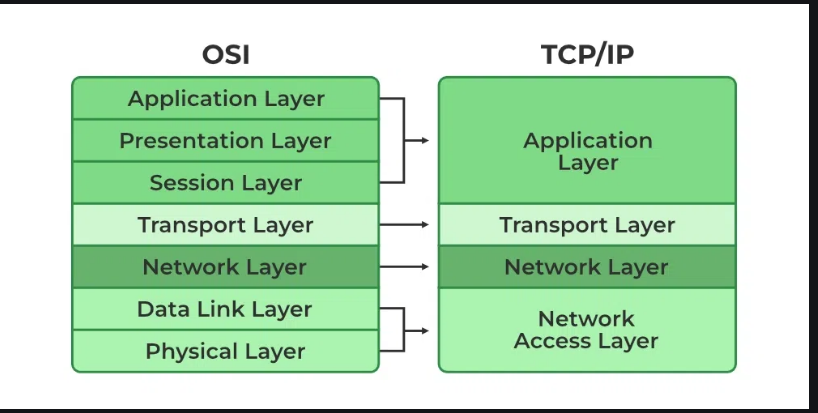
| Layer | Name | Function |
|---|---|---|
| 7 | Application Layer | Provides network services to applications, such as web browsing (HTTP), email (SMTP), and file transfers (FTP). |
| 6 | Presentation Layer | Translates, encrypts, and compresses data for the application layer. Ensures proper data format (e.g., JPEG, MP3, SSL). |
| 5 | Session Layer | Manages sessions between applications, establishing, maintaining, and terminating connections (e.g., RPC, NetBIOS). |
| 4 | Transport Layer | Ensures reliable or unreliable delivery of data using protocols like TCP (reliable) and UDP (unreliable). Handles segmentation, flow control, and error correction. |
| 3 | Network Layer | Handles logical addressing (IP addresses) and routing of packets between networks using routers. Protocols include IPv4, IPv6, ICMP. |
| 2 | Data Link Layer | Manages MAC addresses and error detection, ensuring reliable data transfer over physical media. Switches and NICs operate at this layer. Uses Ethernet, ARP, PPP. |
| 1 | Physical Layer | Deals with the actual transmission of raw bits over network media (cables, radio waves). Includes hardware like hubs, network cables, and modems. |
1. Physical Layer (Layer 1)
- Purpose: Responsible for transmitting raw bitstreams (0s and 1s) over a physical medium.
- Functions:
- Defines hardware specifications like cables, switches, and connectors.
- Manages voltage levels, data rates, and physical connection methods.
- Examples: Ethernet cables, fiber optics, hubs, and repeaters.
2. Data Link Layer (Layer 2)
- Purpose: Provides error detection and ensures reliable transmission over the physical link.
- Functions:
- Frames data (adds start/end delimiters).
- Uses MAC addresses for device identification.
- Handles error correction and flow control.
- Examples: Switches, Network Interface Cards (NICs), protocols like Ethernet and PPP.
3. Network Layer (Layer 3)
- Purpose: Determines the best path for data to travel across networks.
- Functions:
- Manages logical addressing (IP addresses).
- Routes data packets between devices across different networks.
- Handles congestion control and error detection for packets.
- Examples: Routers, IPv4, IPv6.
4. Transport Layer (Layer 4)
- Purpose: Ensures reliable delivery of data end-to-end.
- Functions:
- Provides error recovery and flow control.
- Manages segmentation and reassembly of data.
- Uses protocols like TCP (connection-oriented) and UDP (connectionless).
- Examples: TCP, UDP, port numbers.
5. Session Layer (Layer 5)
- Purpose: Establishes, manages, and terminates communication sessions between applications.
- Functions:
- Maintains session synchronization.
- Manages data exchange between applications.
- Ensures that multiple streams of data don't mix.
- Examples: APIs, remote procedure calls (RPCs).
6. Presentation Layer (Layer 6)
- Purpose: Ensures that data is in a readable and transferable format.
- Functions:
- Handles data translation, encryption, and compression.
- Converts data between application and network formats.
- Examples: SSL/TLS encryption, JPEG, GIF, ASCII.
7. Application Layer (Layer 7)
- Purpose: Provides network services to applications and end-users.
- Functions:
- Supports protocols for file transfers, email, and web browsing.
- Acts as an interface between the user and the network.
- Examples: HTTP, FTP, SMTP, DNS.
Network devices
- Network cables, including fibre-optic, coaxial, and twisted-pair, physically link devices within a network.
- A switch uses MAC addresses to direct traffic between devices on the same network.
- A router connects multiple networks and uses IP addresses to manage data flow between them.
- A modem acts as a bridge between a home network and the internet, facilitating communication with the internet service provider (ISP).
What can a router do that a switch cannot?
A router can filter traffic, while a switch can only switch traffic.
What does a network interface card (NIC) use that is known as a unique physical identifier given by the manufacturer?
A media access control (MAC) address.
Notebooklm summary
The document begins by defining basic networking terms and explaining the internet's purpose and function for users. It explores the history of networking through the development of its components.
History of the Internet:
- The internet's origins can be traced back to the 1960s when the US Department of Defense Advanced Research Projects Agency (DARPA) experimented with packet-switching theory.
- In the 1970s, the Transmission Control Protocol (TCP) and Internet Protocol (IP) were developed to connect multiple networks.
- The 1980s saw the introduction of dial-up access and email communication via local area networks (LANs).
- The 1990s brought the creation of Hypertext Markup Language (HTML), the World Wide Web (WWW), and Uniform Resource Locators (URLs), as well as the launch of Windows 95.
- In the 2000s, networking, the internet and devices rapidly evolved.
Computer Networking: A computer network is a collection of computing devices that are logically connected to communicate and share resources.
- It is compared to a highway system where data travels like a car from one point to another.
A node is any device on a network, like a computer, router or printer.
A host is a node with a unique function, such as a server, that provides access to data or services.
- Basic computer networks consist of nodes connected through links that follow rules to send and receive data.
- In larger networks, computers are grouped into switches, which connect to a router.
Key Components of a Computer Network:
- Client: A hardware device that allows users to access data and networks by sending requests to a server. It can also refer to software, such as a web browser.
- Server: A computer that responds to requests from clients, providing the requested content, like a web server or a print server.
- Network Interface Card (NIC): A hardware component that connects a computer to a network via a cable. Each NIC has a unique Media Access Control (MAC) address assigned by the manufacturer, used to identify senders and receivers of data. It operates at layer 2 of the OSI model.
- Network Cables: Physical connections between network nodes, with Fiber-Optic, Coaxial, and Twisted-Pair (Ethernet) being the three main types.
- Switch: A device that connects all nodes on a network, transmitting data only to the intended recipient using MAC addresses. Switches operate at layer 2 of the OSI model.
- Router: A device that connects multiple networks, filtering data and routing traffic using Internet Protocol (IP) addresses. Routers operate at layers 2 and 3 of the OSI model.
- Modem: A device that connects a home to the internet from an Internet Service Provider (ISP).
Data and the OSI Model:
- Data in computing consists of bits and bytes (0s and 1s). It can be in various forms like text, numbers, media etc.
- The Open Systems Interconnection (OSI) model defines how computers share information over a network.
- The OSI model has seven layers, each with a specific function.
- Application Layer (7): Enables applications to access network services.
- Presentation Layer (6): Ensures data is in a usable format and handles encryption/decryption.
- Session Layer (5): Maintains distinction between data of separate applications.
- Transport Layer (4): Establishes a logical connection and specifies transmission protocols like TCP.
- Network Layer (3): Decides the physical path data will take and uses IP addresses. Data at this layer is called a packet.
- Data Link Layer (2): Defines data format on the network and uses MAC addresses. Data at this layer is called a frame.
- Physical Layer (1): Transmits raw bitstreams over the physical network.
- Data is processed and transformed as it passes down the layers from the source and then unpacked in reverse order at the target computer.
Key Takeaways:
- Computer networks are a collection of devices connected for communication and resource sharing.
- The main components of a network include client devices, servers, NICs and cables, switches and routers.
- The OSI model is a standard for how computers share information.
Comparison of Switches and Routers:
| Feature | Switch | Router |
|---|---|---|
| Layer | Operates at Layer 2 (Data Link) | Operates at Layers 2 & 3 (Data Link & Network) |
| Functionality | Transmits data using MAC addresses | Filters and routes data using IP addresses |
| Data Handling | Deals with frames | Deals with both frames and packets |
This document provides a basic understanding of networking concepts, the history of the internet, and the various hardware and software components involved in networking.